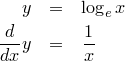
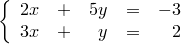
Formulaで数式のサイズを指定する方法
%5C,d%5Cmu(%5Cbar%7Bx%7D)%0A$%7D.png)
**See Also**
* [Formula](http://formula.s21g.com/)It's just a demo of Formula :-)
[math]
a & = & a + 1 \
1 & = & 1 + \frac{1}{a} \
0 & = & \frac{1}{a} \
a & = & \pm\infty
[/math]
このブログではデフォルトでeqnarray*環境なので、こんな感じに書けます。
pre>>
[math]
a & = & a + 1 \
1 & = & 1 + \frac{1}{a} \
0 & = & \frac{1}{a} \
a & = & \pm\infty
[/\math]
<<--
Formula
は、数式を簡単にブログに貼付けて共有できるサービスです。
このたび、FormulaをRails-2.3.2に対応させました。
また、対応作業の過程で、Rails用のpaginationライブラリである、
pagination_scopeのバージョン0.1.2をリリースいたしました。
:groupオプションを含むnamed scopeのpaginationに対応いたしました。
Recently,
the Formula
had been slowing down.
The Formula is the service which provides a way to make images of mathematical expressions for embedding it into your blogs, BBSs and so on.
There was the problem in the manner of ranking the referred formulae.
So I solved the issue by choosing simpler algorithm.
Now it became faster.
Please try it again if you've given up once before for the slowness of the service.
Thank you for patience.
I will keep appreciating any kind of feedbacks.
Feel free to contact us.
So that you can use it for bulletin boards which are capable to interpret BBCode such as phpBB.
phpBBなどのBBCodeに対応した掲示板などで、簡単に数式をお使いいただくことができます。今度はtridentを実行した結果、以下のようなWARNINGが出ました。
DEPRECATION WARNING: Inflector is deprecated! Use ActiveSupport::Inflector instead. See http://www.rubyonrails.org/deprecation for details. (called from formula/config/initializers/inflections.rb:5)
なるほど。とりあえず、いわれたとおりに修正してみます。
Globalの名前空間を掃除する方向なのかな。
とりあえず、それ以外は特に問題なく移行完了。
I made an Ubiquity command in order to enable us to get images of mathematical equations from anywhere at anytime.
It uses
the Formula
, which is the service for making images of mathematical formulae.
You can also get a preview of your input in real time, like this.
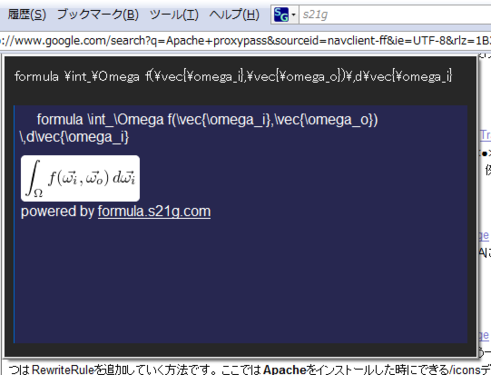
INSTALL
The command is able to be installed from here.
NOTE1: You need
the Ubiquity
, an extension of the Firefox, to use ubiquity commands.
NOTE2: This command requires BASIC authentication via SSL at the first time in order to prevent SPAM posts.
When you get the dialog box of the authentication,
please enter your name and password which were used when you left a comment at the Formula.
It means that you must leave at least one comment to the Formula for being authorized.
Formula
を使って、Ubiquityから数式を投稿するUbiquityコマンドを作ってみました。
こんな感じに、Previewも実装しています。

これを使えば、いつでもどこからでも、数式を投稿することができます。
コマンドを実行すると、Formula上の数式ページにジャンプするので、
埋め込みようタグを使ってブログに投稿することも簡単にできます。
インストール
formula用Ubiquityコマンドは、以下のページからインストールできます。
配布には拙作の
Gist Ubiquitifier
を使っています。
ご注意
スパムプログラムからの投稿などを避けるために、
SSL+Basic認証による認証をかけています。
本コマンドを最初に実行する時に、Basic認証のダイアログが出ます。
Basic認証に使うユーザ名とパスワードは、
Formula上でコメントをする時に使ったものをご利用ください。
Formula上に1つでもコメントがあれば、本コマンドが利用可能になります。
Markdownをpreg-markdownに切り替える
ついでに、
Formulaの
コメントのプレビューができるようにしました。
コメント中に $x=y$ のように記述することでインライン形式で数式を記述できます。
また、
\\[
f(x)=\int_0^x g(t)\,dt
\\]
のように書くことで、ディスプレイスタイルで数式を含めることも出来ます。
そのうちこちらのブログでもこの記法を使えるようにする予定です。
XyMTeXの記法については、以下のサイトを参照ください。
**See Also**
* [XyMTeX Ver 4.03](http://homepage3.nifty.com/xymtex/fujitas3/xymtex/xym403/xymup403.html)
* [XyMTeX 化学構造式描画システム](http://homepage3.nifty.com/xymtex/fujitas3/xymtex/index.html)
本サービスに関する各種お問い合わせは
までお気軽にお寄せください。