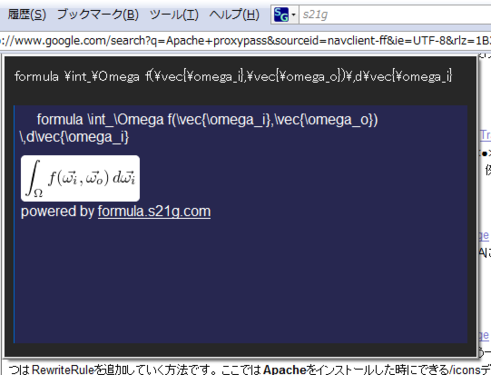
I made an Ubiquity command in order to enable us to get images of mathematical equations from anywhere at anytime. It uses the Formula , which is the service for making images of mathematical formulae.

You can also get a preview of your input in real time, like this.

formula_u.png

INSTALL

The command is able to be installed from here.

NOTE1: You need the Ubiquity , an extension of the Firefox, to use ubiquity commands.

NOTE2: This command requires BASIC authentication via SSL at the first time in order to prevent SPAM posts. When you get the dialog box of the authentication, please enter your name and password which were used when you left a comment at the Formula. It means that you must leave at least one comment to the Formula for being authorized.

posted by Png takiuchi on Thu 4 Sep 2008 at 04:50

Formula を使って、Ubiquityから数式を投稿するUbiquityコマンドを作ってみました。 こんな感じに、Previewも実装しています。

formula_u.png

これを使えば、いつでもどこからでも、数式を投稿することができます。 コマンドを実行すると、Formula上の数式ページにジャンプするので、 埋め込みようタグを使ってブログに投稿することも簡単にできます。

インストール

formula用Ubiquityコマンドは、以下のページからインストールできます。

配布には拙作の Gist Ubiquitifier を使っています。

ご注意

スパムプログラムからの投稿などを避けるために、 SSL+Basic認証による認証をかけています。

本コマンドを最初に実行する時に、Basic認証のダイアログが出ます。 Basic認証に使うユーザ名とパスワードは、 Formula上でコメントをする時に使ったものをご利用ください。 Formula上に1つでもコメントがあれば、本コマンドが利用可能になります。

posted by Png genki on Thu 4 Sep 2008 at 02:54

prawnto(プラウント?)使ってみました。まだ課題があるのですが、現時点でのメモです。

http://cracklabs.com/prawnto
http://cracklabs.com/prawnto/demos:デモ一覧
http://github.com/thorny-sun/prawnto/tree/master
git://github.com/thorny-sun/prawnto.git

生成したPDF

以前の記事をPDFにしてみました。
生成されたPDF:test.pdf

pluginのインストール

prawnライブラリを使っているので、ますprawnをインストール。その後prawnto pluginインストール。

   1  sudo gem install prawn
   2  ./script/plugin install    git://github.com/thorny-sun/prawnto.git

(日本語表示用に)IPAフォントをダウンロード

下記からダウンロードして解凍、ttfファイルをアクセス可能なところにコピーします。
http://ossipedia.ipa.go.jp/ipafont/

配置するとしたら下記でしょうか。

  • #{RAILS_ROOT}/vendor/fonts
  • #{RAILS_ROOT}/vendor/font_ttf
  • /usr/share/fonts/
  • /usr/local/share/fonts/)

Rails controller, view

まずはController
page_layoutは:portrailt(縦)か:landscape(横)のどちらかです。

   1  #controller
   2      respond_to do |format|
   3        format.html { render :action => 'show' }
   4        format.pdf {
   5          prawnto :prawn => {
   6            :page_layout => :portrait, #
   7            :page_size => "A4",
   8            :left_margin => 36,
   9            :right_margin => 24,
  10            :top_margin => 24,
  11            :bottom_margin => 24},
  12          :inline => true
  13        }
  14      end

そしてview(show.pdf.prawnという形式のファイル)

   1  #show.pdf.prawn
   2  pdf.font "#{RAILS_ROOT}/public/ipag.ttf"
   3  pdf.text @article.title, :size => 36
   4  pdf.text @article.body
   5  pdf.text "This page has very wide left and right margins, causing a squeeze. " * 10
   6  pdf.text "これはテストです。" * 20
   7  pdf.font "Times-Roman"
   8  pdf.text "abcdefghijklmnopqrstu"* 20, :wrap => :character
   9  pdf.text "http://thebogles.com/blog/2007/10/how-to-add-google-adsense-for-mobile-to-your-ruby-on-rails-site/"

現時点での課題

  • URLや日本語の文章など空白がない文字列?だと折り返されない
    => demoで紹介されている:wrap => :characterオプションが0.1.2だとなさそう?
  • レイアウト枠のpdfを重ねたりする機能はない?(発見できず)
posted by Png satoko on Wed 3 Sep 2008 at 23:28 with 2 comments

Rails-2.0.2以降から存在するBasic認証機能ですが、 この挙動をテストする方法をメモしておきます。

   1  request.env['HTTP_AUTHORIZATION'] =
   2    'Basic ' + Base64::encode64("name:password")

テストコードのなかで、上記のように環境変数を設定してから アクションを実行すればOkです。

posted by Png genki on Wed 3 Sep 2008 at 09:09

早速 GoogleのChrome を使ってみました。 Firefoxでは3秒かかるこのブログのレンダリングも、 2秒程度で完了するなど、非常に軽快に動作しますね。 デフォルトでFirebug的な開発環境がついてくるのも素晴らしいです。

Google ChromeのFAQ を読んでみたところ、

18. How can I include my site's search in Google Chrome's search options?

By providing an OpenSearch description document (OSDD), you enable Google Chrome to include your site in the list of search engines in the browser. For more information about OpenSearch, please visit http://www.opensearch.org.

と書かれていたので、XMLファイルを色々変更して試してみましたが、 なぜかまだOpenSearchを検出してくれないようです。 Beta版だからでしょうか。

自動検出はしてくれませんでしたが、 アドレスバーを右クリックして「検索エンジンを編集」から、 検索エンジンを追加することで、同様のことが実現できそうです。

ちなみに、s21gブログの検索をGoogle Chromeから実現するためには、 キーワードとともに、URLを以下のように指定すればOkです。

  • http://blog.s21g.com/?query=%s

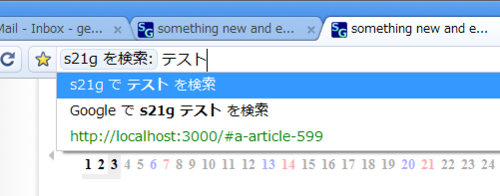
これによって、以下のようにアドレスバーから、 指定したキーワードに続いて検索ワードを入力することにより、 s21gブログ内を検索できるようになります。

s21gsearch.png

必要な機能は実装されているようなので、 あとは自動検出ができたらいいんですけどね。 何か方法があるのかな。

posted by Png genki on Wed 3 Sep 2008 at 05:45

s21gブログが、記事の投稿時と記事を修正した時に Google Blog Search にPingを送るようになりました。

よろしくお願いします。

posted by Png genki on Wed 3 Sep 2008 at 02:08

たびたび参照したくなるのでチートシート的にまとめておきます。 より詳細な情報は Phusion Passenger users guide をご確認ください。

  • PassengerRoot <directory>
  • RailsBaseURI <uri>
  • RailsAutoDetect <on|off>
  • RailsAllowModRewrite <on|off>
  • RailsRuby <filename>
  • RailsEnv <string>
  • RailsSpawnMethod <string>
  • RailsMaxPoolSize <integer>
  • RailsPoolIdleTime <integer>
  • RailsMaxInstancesPerApp <integer>
  • RailsUserSwitching <on|off>
  • RailsDefaultUser <username>

See Also

posted by Png genki on Tue 2 Sep 2008 at 05:42

商品取引の際に、商品を受け取るときに支払いをせずに、月末などにまとめて支払う場合には「売掛金」勘定を使用しました。
商品を受け渡す際に支払を受けずに、月末などにまとめて受け取る場合には「買掛金」勘定を用いました。

売掛金、買掛金は商品取引の際にのみ使うもので、その他の取引の際には使いません。
その他の取引というのは、「車両運搬具、備品などの購入、売却」「有価証券の購入、売却」などのことです。

まずは、未払金についてです。
たとえば、ロッカーを200,000円で購入したが、代金は月末払いとしたとします。

その場合の仕訳は、

借方貸方
備品200000未払金200000

と、なります。

その後、月末に小切手で支払いをしたとします。

その場合の仕訳は、

借方貸方
未払金200000当座預金200000

と、なります。

未払金は負債です。

次に、未収金についてです。 たとえば、社用車を1,000,000円で売却したが、代金の受取は月末にしたとします。

その場合の仕訳は、

借方貸方
未収金200000車両運搬具200000

と、なります。

その後、月末に代金を小切手で受け取ったとします。

その場合の仕訳は、

借方貸方
現金200000未収金200000

と、なります。

未収金は資産です。

posted by Png mari on Mon 1 Sep 2008 at 17:08

http://thebogles.com/blog/2007/10/how-to-add-google-adsense-for-mobile-to-your-ruby-on-rails-site/
http://thebogles.com/_adsense.rhtml

手順

  1. 自分のアドセンスIDpub-123456789を取得
  2. モバイル コンテンツ向け AdSenseを開始しておく
  3. 下記のページを自分のRailsのviewsサブディレクトリにコピー
    http://thebogles.com/_adsense.rhtml
  4. 手順3でコピーしたページの8行目にあるcliend_idを手順1で取得した自分のアドセンスIDと置き換える
  5. アドセンスを載せたい場所に下記を挿入
       1  <%= render :partial => "adsense" %>
    
  6. おしまい

PS PCから表示確認を行うと <!-- google_afm -->というコメントが出るだけなので、携帯から確認を行ってください。

posted by Png satoko on Mon 1 Sep 2008 at 16:53

I made a tiny presentation tool for terminal addicts (of course including myself ;-)

USAGE is in README and sample directory.

You can make a presentation by using your favorite terminal like this.

   1  
   2  
   3  
   4        _                  _
   5       |_)   |_     _ ._  |_) _.o| _
   6       | \|_||_)\/ (_)| | | \(_|||_>
   7                /
   8  
   9       The Web Application Framework
  10  
  11          s21g LLC Genki Takiuchi
  12  
  13  
  14   1/15|**                          |00:02

I'd used this tool at the LL future.

posted by Png takiuchi on Mon 1 Sep 2008 at 11:54