debianで普通にsnmpdをパッケージからインストールすると、

   1  # netstat -lnp | rak snmp
   2    17|udp    0   0 127.0.0.1:161   0.0.0.0:*   13404/snmpd

このように、127.0.0.1にbindしてlistenするようになっているため、 プライベートネットワーク内のほかのサーバ (cactiとかが動いているもの)から接続できません。

この辺の設定を変えるには、/etc/default/snmpdを 以下のように編集します。

   1    ..(略)..
   2  
   3  # snmpd options (use syslog, close stdin/out/err).
   4  SNMPDOPTS='-Lsd -Lf /dev/null -u snmp -I -smux -p /var/run/snmpd.pid 192.168.10.123'
   5  
   6    ..(略)..

192.168.10.123というのは適当な数字です。 あとはsnmpdを再起動しましょう。

posted by Png genki on Sun 9 Dec 2007 at 01:15

先日お伝えしたとおり、Rails 2.0がリリースされましたね。

Rails 2.0: It's done!

Rails 2.0 is finally finished after about a year in the making. This is a fantastic release that’s absolutely stuffed with great new features, loads of fixes, and an incredible amount of polish. We’ve even taken a fair bit of cruft out to make the whole package more coherent and lean.

Railsを使い始めたのが2005年の12月、ちょうどRails 1.0がリリースされた ころの事。あれからちょうど2年の歳月が流れました。 感慨深いものです。

末尾が偶数バージョンがリリースされると、すぐに奇数バージョン が跡を追うのは相変わらずですね ;-)

早速ですが、このブログシステムもRails 2.0(2.0.1)に移行しました。 1.2.5から、RC1、RC2を経て、バージョンアップをしてみましたが、 特に大きな問題は発生しなかったです。

posted by Png genki on Sat 8 Dec 2007 at 09:41

新しいscriptとして、script/performance/requestというものが 新たに加わったみたいです。

   1  h% ./script/performance/request --help
   2  USAGE: ./script/performance/request [options] [session script path]
   3      -n, --times [0000]               How many requests to process. Defaults to 100.
   4      -b, --benchmark                  Benchmark instead of profiling
   5          --open [CMD]                 Command to open profile results. Defaults to "open %s &"
   6      -h, --help                       Show this help

ふむふむ。ベンチマーク系のスクリプトのようですね。 紹介してる記事を見つけました。

New in Rails: a request profiler for profiling your app

Jeremy Kemper (aka bitsweat) committed a very useful tool into the Rails trunk not too long ago: a request profiler! It’s a human-friendly wrapper script around the ruby-prof library, a nice ruby code profiler, that lets you run multiple requests against a URI in your application and get a detailed code profile report in text and HTML.

おーなるほど。前回のRails勉強会で紹介した ruby-prof を human-friendlyにしてくれるツールですか。これは面白そうですね。

試してみようと思って触ってみたら、上のサイトで紹介されてる ものと、Rails 2.0で入ったものは若干インターフェイスが違う模様。

DHHが書いてる こっちの情報 が最新のようです(以下に抜粋)

Action Pack: New request profiler

Figuring out where your bottlenecks are with real usage can be tough, but we just made it a whole lot easier with the new request profiler that can follow an entire usage script and report on the aggregate findings. You use it like this:

$ cat login_session.rb
get_with_redirect '/'
say "GET / => #{path}" 
post_with_redirect '/sessions', :username => 'john', :password => 'doe'
say "POST /sessions => #{path}" 
$ ./script/performance/request -n 10 login_session.rb

And you get a thorough breakdown in HTML and text on where time was spent and you’ll have a good idea on where to look for speeding up the application.

なにやらIntegrationTestのコードのようなものを記述したスクリプト を用意して、そのpathを渡せば良いみたいです。

posted by Png genki on Sat 8 Dec 2007 at 09:39

基本はstableで使いつつ、ちょっと使ってみたい新しい パッケージがある場合だけ、unstableから持ってくるような使い方を する場合のaptの設定メモ。

まずはsources.listにunstableを追加。

/etc/apt/sources.list

   1  deb http://cdn.debian.or.jp/debian/ etch main contrib non-free
   2  deb-src http://cdn.debian.or.jp/debian/ etch main contrib non-free
   3  
   4  deb http://security.debian.org/ etch/updates main contrib
   5  deb-src http://security.debian.org/ etch/updates main contrib
   6  
   7  deb http://cdn.debian.or.jp/debian/ unstable main contrib non-free
   8  deb-src http://cdn.debian.or.jp/debian/ unstable main contrib non-free

それがすんだら、優先度の設定を行います。

/etc/apt/preferences

   1  Package: *
   2  Pin: release a=stable
   3  Pin-Priority: 100
   4  
   5  Package: *
   6  Pin: release a=stable-proposed-updates
   7  Pin-Priority: 110
   8  
   9  Package: *
  10  Pin: release a=unstable
  11  Pin-Priority: 90

ついでに、キャッシュ容量の設定なども行っておきましょう。

/etc/apt/apt.conf

   1  APT::Cache-Limit "100000000";
   2  APT::Default-Release "stable";

上記の設定ファイルファイルが無い場合は、新しく作成します。

これで完了。あとはapt-get updateすればOK。 必要に応じて、-t unstable オプションを指定して unstableの パッケージを利用できます。

posted by Png genki on Sat 8 Dec 2007 at 07:30

acts_as_searchableを使う程度であれば、例えばDebianなら、 aptでhyperestraierのパッケージを入れるだけで十分なのですが、 estcmd等のコマンドラインツールを使ったりしようとすると、 estraier というRubyGemsが必要になったりします。

   1  # estcmd
   2  /usr/local/lib/ruby/site_ruby/1.8/rubygems.rb:304:in `report_activate_error': Could not find RubyGem estraier (> 0) (Gem::LoadError)
   3          from /usr/local/lib/ruby/site_ruby/1.8/rubygems.rb:238:in `activate'
   4          from /usr/local/lib/ruby/site_ruby/1.8/rubygems.rb:76:in `active_gem_with_options'
   5          from /usr/local/lib/ruby/site_ruby/1.8/rubygems.rb:50:in `gem'
   6          from /usr/local/bin/estcmd:15

このestraierをインストールするためには、HyperEstraier のパッケージ以外にも、 QDBM の開発用ライブラリパッケージを インストールしておく必要があります。

   1  # aptitude install libqdbm-dev

あとは、gemコマンドで通常通りにestraierをインストールします。

   1  # gem install estraier

これで estcmd などのコマンドラインツールが使えるようになります。

   1  # estcmd
   2  estcmd: command line utility for the core API of Hyper Estraier
   3  
   4  usage:
   5    estcmd put [-cl] [-ws] db [file]
   6    estcmd out [-cl] db expr
   7    estcmd edit db expr name [value]
   8    estcmd get db expr [attr]
   9    estcmd uriid db uri
  10    estcmd inform db
  11    estcmd optimize [-onp] [-ond] db
  12    estcmd merge [-cl] db target
  13    estcmd search [-vu|-va|-vf|-vs] [-gs|-gf|-ga] [-cd] [-ni] [-sf|-sfr|-sfu|-sfi] [-attr expr] [-ord expr] [-max num] [-sk num] [-aux num] [-dis name] db [phrase]

posted by Png genki on Fri 7 Dec 2007 at 18:08

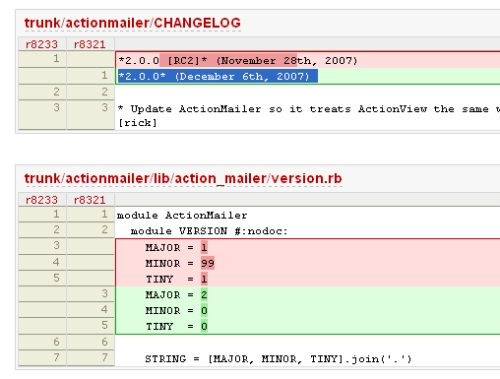
Changeset 8321 - Rails Trac - Trac

Preparing for release shortly

Tracのタイムラインを見ていたら、Rails 2.0が本日 (米国時間だと12/6)リリースするみたいですね。

rails_2_0

posted by Png genki on Fri 7 Dec 2007 at 08:52

ワークパイル(Work pile)は、並列処理の為のアルゴリズムの一種です。

lucille 開発日記: マルチスレッド化: ワークパイル

簡単に云ってしまえば、ワークパイルはサーバ/クライアント機構と似たようなもので、ジョブを処理するスレッド部分ではマスタースレッドから仕事(ジョブ)を受け取って処理し、仕事がなくなるまでループするというものです。

いわゆる生産者消費者問題を解決する手法の一つですね。 ちょっとサンプルコードを見てもらったほうがはやいかも。

workpile.rb

   1  require 'thread'
   2  
   3  class Workpile
   4    def initialize(num_workers)
   5      @queue = Queue.new
   6      @workers = ThreadGroup.new
   7  
   8      # Spawn worker threads
   9      num_workers.times do |i|
  10        @workers.add(Thread.new do
  11          puts "Worker #%d is ready." % i
  12          loop do
  13            @queue.pop.call # work
  14            puts " (#%d)" % i
  15          end
  16        end)
  17      end
  18    end
  19  
  20    def push_task(&block)
  21      @queue.push block
  22      @workers.list.sort_by{rand}.each{|worker| worker.run} # wake up!
  23    end
  24  
  25    def start
  26      while input = gets.chomp
  27        break if input == 'exit'
  28        input.split('').each do |i|
  29          push_task{print i}
  30        end
  31      end
  32    end
  33  end
  34  
  35  Workpile.new(3).start

出力結果

   1  % ruby workpile.rb
   2  Worker #0 is ready.
   3  Worker #1 is ready.
   4  Worker #2 is ready.
   5  hello!
   6  h (#0)
   7  e (#2)
   8  l (#1)
   9  l (#0)
  10  o (#2)
  11  ! (#0)

3つのワーカースレッドを作成して、投入したタスクを処理しています。 RubyのQueueは同期の面倒を見てくれるので、何も考えずにpushpopでタスクのやり取りを行うことができてしまいます。 しかも、キューが空になったらカレントスレッドを停止するように なってるんですね。

並列処理というとC/C++でCriticalSectionやmutexのネイティブAPIを さわるようなのばかりだったので、こんなに簡潔に記述できるのは 良いですね。やはりインターフェイス重要だな。

クリスマスに出る(という噂の)Ruby 1.9でネイティブスレッド化されたら、 もっと楽しいかもしれませんねー。

posted by Png genki on Fri 7 Dec 2007 at 06:14

ちょっと使ってみて良い感じだったので紹介します。

Rak

Rak is a grep replacement in pure Ruby. It accepts Ruby syntax regular expressions and automatically recurses directories, skipping .svn/, .cvs/, pkg/ and more things you don't care about. It is based on the Perl tool ack by Andy Lester.

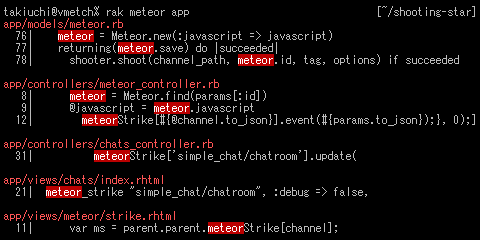
Pure ruby で書かれた grep みたいな感じですね。 なんといっても見た目が美しい。

rak_demo

デフォルトで再帰的に、.svn や .cvs を無視して検索してくれる というのも良い感じ。

RubyGemsとして提供されているので、インストールするのは

   1  % sudo gem install rak

でOKです。

See Also

更新履歴

  • [2007/12/5 23:08] ackへのポインタを追加。
  • [2007/12/26] ソケットファイルがある場合の問題への対処法の紹介
posted by Png genki on Wed 5 Dec 2007 at 20:40

昨年 に続いて今年も、 東京と関東のRubyの忘年会2007 が行われるようです。

Rubyistの皆さん、今年も一年間お疲れさまでした。

RubyKaigi2007での感動的スピーチがまだまだ記憶に新しい今日この頃ですが、早いもので師走を迎え、今年も残すところあと一ヶ月となりました。

ということで、今年の振り返りと来年に向けた英気を養う場として忘年会を行いたいと思います。皆様お誘い合わせのうえ、年忘れ出来る人も出来ない人も(出来ないけど忘れたい人も)奮ってご参加くださいませ。

早速参加申請。もろはしさん、幹事お疲れ様です。

posted by Png genki on Mon 3 Dec 2007 at 12:27

TAG_rel_2-0-0_RC2をfreezeしたプロジェクトでDBを作成しようとしたところ、下記のエラーが。

   1  $ sudo rake db:create RAILS_ENV='production'
   2  (in /usr/local/foo)
   3  rake aborted!
   4  undefined method `whiny_protected_attributes=' for ActiveRecord::Base:Class
   5  
   6  (See full trace by running task with --trace)

同じことを言っている人がrubyonrails.comのコメントにもいて、ちゃんとJeremy Kemperが返事を書いています。
http://documentation.rubyonrails.com/2007/11/9/rails-2-0-release-candidate-1#comment-17936

delete the whiny_protected_attributes setting from your environement. It was in the preview release but is not in the release candidate, so if you generated an app with the preview and are now upgrading it, you’ll need to remove that line.

というわけでconfig/environments/production.rb内で下記をコメントアウトしました。

   1  # Disable raising errors when mass-assigning to a protected attribute
   2  # config.active_record.whiny_protected_attributes = false

すんなり解決。

posted by Png satoko on Mon 3 Dec 2007 at 11:23