• 1
  • 2
  • 3
  • 4
  • 5
  • 6
  • 7
  • 8
  • 9
  • 10
  • 11
  • 12
  • 13
  • 14
  • 15
  • 16
  • 17
  • 18
  • 19
  • 20
  • 21
  • 22
  • 23
  • 24
  • 25
  • 26
  • 27
  • 28
  • 29
  • 30
  • 31

溶けたiPhone事件の後、新しいiPhoneにしてからエラーが出だしたのですが、これのお陰でバックアップが出来なくなってしまいました。
で、バックアップに失敗するので、iOSのアップデートにも失敗するという事になってしまい………ついに解決を目指す事に。

iOSのアップデート失敗時に下記を見るように指示されたので、Resolutionの項を一つ一つ試して行きます。

Update and restore alert messages on iPhone, iPad, and iPod touch
http://support.apple.com/kb/TS1275

でもだめです、解決しません。
アップデートをする際に、ステップの一部としてバックアップをするようになっているのですが、そこで失敗しているようです。

というわけで、まずはバックアップが成功するのを目指すことにしました。
ですが通常のバックアップも(ちゃんと)失敗して、下記のメッセージが表示されてしまいます…:
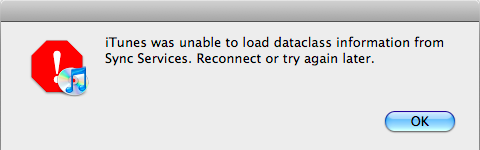
itunes_error_sync_services.png

iTunes was unable to load dataclass information from Sync Services. Reconnect or try again later.

メッセージ内容で検索してみたら下記が出てきました。
2008年7月の質問ですが、返信の中に「治ったー!」という報告がいくつかあったので試してみることに。

MacRumors Forums:"iTunes was unable to load dataclass information from Sync Services.... Jul 17, 2008, 03:42 AM
http://forums.macrumors.com/showthread.php?t=524354

回答として挙げられていたのは下記のリンク。

iTunes: How to remove and reinstall the Apple Mobile Device Service on Mac OS X
http://support.apple.com/kb/HT1747?viewlocale=en_US

下の方にある、OS XのApple Mobile Device Serviceを削除・再インストールする方法をやってみました。ざっくりと訳します。

###OS XのApple Mobile Device Serviceを削除・再インストールする方法

  1. iPhone、iPad、iPodをMacと繋がっているケーブルから外す

  2. FinderでApplicationsフォルダ内にあるiTunes.appファイルをごみ箱に捨てる。iTunesアイコンも捨てる。

  3. FinderのメニューでGo > Go to Folderを選択、下記を開く:
    /System/Library/Extensions

  4. AppleMobileDevice.kextファイルをごみ箱に捨てる

  5. FinderのメニューでGo > Go to Folderを選択、下記を開く:
    /Library/Receipts/

  6. ** AppleMobileDeviceSupport.pkg**ファイルをごみ箱に捨てる。認証ダイアログが出てきたら、administratorパスワードを入力する。
    注意:Mac OS X v10.6以降の場合は、このファイルがないかもしれない。その場合は次のステップへ。

  7. Macを再起動する

  8. FinderメニューでFinder > Empty Trashを選択、Macを再起動する。

  9. iTunesの最新版をダウンロード、再インストール。

  10. Macにデバイスを接続して、iTunesを開く

さてこの作業後、iPhoneを接続してみたら…みごとバックアップも成功、iOSも更新できました!

posted by satoko satoko on Wed 11 May 2011 at 06:09 with 3 comments

以前紹介した
BenchmarkForRails
は、Railsアプリケーションの詳細なベンチマークを
行うことが出来る便利なプラグインですが、
rake test:unitsの実行でエラーが発生する問題が
起こっていました。

調べてみたところ、init.rbファイルにrequire文が
足りていないのが原因のようだったので、対処法を紹介します。

vendor/plugins/benchmarkforrails/init.rb

rails>>
require 'dispatcher'
require 'benchmark_for_rails'

The special :request benchmark. This tries to encompass everything that runs

to handle a request.

BenchmarkForRails.watch(:request, ::Dispatcher, :dispatch)
<<--

上記の2行目を加えることで、エラーが出なくなります。

posted by genki genki on Sat 22 Dec 2007 at 22:21 with 0 comments

TAG_rel_2-0-0_RC2をfreezeしたプロジェクトでDBを作成しようとしたところ、下記のエラーが。

shell-unix-generic>>
$ sudo rake db:create RAILS_ENV='production'
(in /usr/local/foo)
rake aborted!
undefined method `whiny_protected_attributes=' for ActiveRecord::Base:Class

(See full trace by running task with --trace)
<<--

同じことを言っている人がrubyonrails.comのコメントにもいて、ちゃんとJeremy Kemperが返事を書いています。
http://documentation.rubyonrails.com/2007/11/9/rails-2-0-release-candidate-1#comment-17936

delete the whiny_protected_attributes setting from your environement. It was in the preview release but is not in the release candidate, so if you generated an app with the preview and are now upgrading it, you’ll need to remove that line.

というわけでconfig/environments/production.rb内で下記をコメントアウトしました。

shell-unix-generic>>

Disable raising errors when mass-assigning to a protected attribute

config.active_record.whiny_protected_attributes = false

<<--

すんなり解決。

posted by satoko satoko on Mon 3 Dec 2007 at 11:32 with 0 comments